
华硕SABERTOOTHZ97MARK1规格参数
中央处理器
支持英特尔®Socket1150第4/5代酷睿™i7/酷睿™i5/酷睿™i3/奔腾®/赛扬®处理器
支持英特尔®22nm处理器
支持英特尔®TurboBoost2.0技术
*是否支持Intel®TurboBoost2.0技术的支持依照处理器类型而不同。
芯片组
支持英特尔®Z97
内存
4xDIMM内存插槽,最大容量32GB,DDR31866/1600/1333MHzNon-ECC,Un-buffered内存*
双通道内存架构
支持Intel®ExtremeMemoryProfile(XMP)技术
*对HyperDIMM的支持功能由CPU的物理特性而定。
USB接口
Intel®Z97芯片组:
6xUSB3.0/2.0连接端口(2个位于后侧面板,蓝色,4个位于主板中央)
ASMedia®USB3.0控制器:
2xUSB3.0/2.0连接端口(2个位于后侧面板,蓝色)
Intel®Z97芯片组:
8xUSB2.0/1.1连接端口(4个位于后侧面板,黑色,4个位于主板中央)
尺寸规格
ATX型式
12英寸x9.6英寸(30.5厘米x24.4厘米)
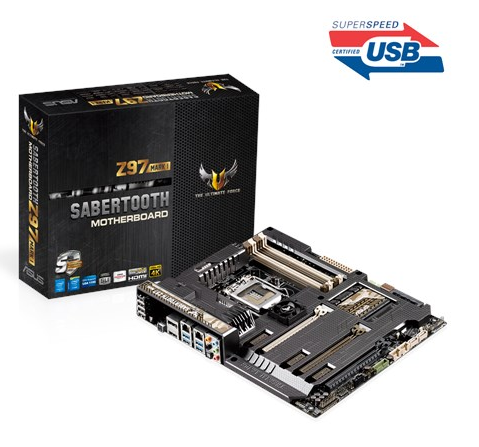
华硕SABERTOOTHZ97MARK1主板采用LGA1150插槽支持全新第4代/5代英特尔®酷睿™i7/i5/i3/Pentium®/Celeron®处理器,Intel®Z97Express芯片,防尘卫士,杜绝灰尘困扰。以下文档是华硕SABERTOOTHZ97MARK1用户手册,为英文版本,有需要的朋友可立即下载此文档。
本文档为PDF格式文档,因此需确保在阅读之前你已经安装了pdf阅读器,如果尚未安装阅读器,建议下载福昕pdf阅读器或其他PDF阅读器,进行安装后阅读。曹操清理app下载-曹操清理app1.0.0安卓版
温馨提示:
华硕SABERTOOTHZ97MARK1用户手册目录
Safetyinformation......................................................................................................vi
Aboutthisguide........................................................................................................vii
SABERTOOTHZ97MARK1specificationssummary............................................ix
Packagecontents.....................................................................................................xiii
Installationtoolsandcomponents.........................................................................xiv
Chapter1: ProductIntroduction
1.1 Specialfeatures..........................................................................................1-1
1.1.1 Producthighlights........................................................................1-1
1.1.2 “UltimateCOOL”ThermalSolutions...........................................1-2
1.1.3 “TUFEngine”PowerDesign.......................................................1-3
1.1.4 “Safe&Stable!”GuardianAngel.................................................1-3
1.1.5 ASUSEZDIY..............................................................................1-4
1.1.6 ASUSExclusiveFeatures...........................................................1-5
1.1.7 Otherspecialfeatures.................................................................1-6
1.2 Motherboardoverview...............................................................................1-7
1.2.1 Beforeyouproceed.....................................................................1-7
1.2.2 Motherboardlayout.....................................................................1-8
1.2.3 CentralProcessingUnit(CPU).................................................1-10
1.2.4 Systemmemory........................................................................1-11
1.2.5 Expansionslots.........................................................................1-23
1.2.6 Onboardbuttons.......................................................................1-25
1.2.7 Jumpers....................................................................................1-26
1.2.8 OnboardLEDs..........................................................................1-28
1.2.9 Internalconnectors....................................................................1-29
Chapter2: Basicinstallation
2.1 BuildingyourPCsystem...........................................................................2-1
2.1.1 Motherboardinstallation..............................................................2-1
2.1.2 CPUinstallation...........................................................................2-3
2.1.3 CPUheatsinkandfanassemblyinstallation...............................2-4
2.1.4 DIMMinstallation.........................................................................2-6
2.1.5 ATXPowerconnection................................................................2-7
2.1.6 SATAdeviceconnection.............................................................2-8
2.1.7 FrontI/OConnector....................................................................2-9
2.1.8 ExpansionCardinstallation.......................................................2-10
2.2 BIOSupdateutility...................................................................................2-11
2.3 Motherboardrearandaudioconnections.............................................2-12
2.3.1 RearI/Oconnection..................................................................2-12
2.3.2 AudioI/Oconnections...............................................................2-14
2.4 Startingupforthefirsttime....................................................................2-16
2.5Turningoffthecomputer........................................................................2-16
Chapter3: BIOSsetup
3.1 KnowingBIOS............................................................................................3-1
3.2 BIOSsetupprogram..................................................................................3-2
3.2.1 EZMode......................................................................................3-3
3.2.2 AdvancedMode..........................................................................3-4
3.2.3 Q-FanControl.............................................................................3-7
3.2.4 EZTuningWizard.......................................................................3-9
3.3 MyFavorites.............................................................................................3-10
3.4 Mainmenu................................................................................................3-12
3.5 AiTweakermenu......................................................................................3-14
3.6 Advancedmenu.......................................................................................3-30
3.6.1 CPUConfiguration....................................................................3-31
3.6.2 PCHConfiguration....................................................................3-34
3.6.3 PCHStorageConfiguration.......................................................3-35
3.6.4 SystemAgentConfiguration.....................................................3-37
3.6.5 USBConfiguration....................................................................3-38
3.6.6 PlatformMiscConfiguration......................................................3-39
3.6.7 OnboardDevicesConfiguration................................................3-41
3.6.8 APMConfiguration....................................................................3-43
3.6.9 NetworkStackConfiguration.....................................................3-44
3.6.10 Intel(R)RapidStorageTechnology...........................................3-45
3.7 Monitormenu...........................................................................................3-46
3.8 Bootmenu................................................................................................3-51
3.9 Toolmenu.................................................................................................3-57
3.9.1 ASUSEZFlash2Utility............................................................3-57
3.9.2 ASUSO.C.Profile.....................................................................3-58
3.9.3 ASUSDRAMSPDInformation.................................................3-59
3.10 Exitmenu..................................................................................................3-60
3.11 UpdatingBIOS..........................................................................................3-61
3.11.1 EZUpdate.................................................................................3-61
3.11.2 ASUSEZFlash2......................................................................3-62
3.11.3 ASUSCrashFreeBIOS3..........................................................3-63
Chapter4: Softwaresupport
4.1 Installinganoperatingsystem.................................................................4-1
4.2 SupportDVDinformation..........................................................................4-1
4.2.1 RunningthesupportDVD...........................................................4-1
4.2.2 Obtainingthesoftwaremanuals..................................................4-3
4.3 Softwareinformation.................................................................................4-4
4.4 AISuite3.....................................................................................................4-4
ThermalRadar2..........................................................................................4-7
4.4.1 AiCharger+...............................................................................4-11
4.4.2 EZUpdate.................................................................................4-12
4.4.3 USBBIOSFlashback................................................................4-14
4.4.4 PushNotice...............................................................................4-16
4.4.5 USB3.0Boost...........................................................................4-19
4.4.6 SystemInformation...................................................................4-20
4.4.7 USBCharger+...........................................................................4-22
4.4.8 Version......................................................................................4-23
4.5 TurboLAN.................................................................................................4-24
4.6 Audioconfigurations...............................................................................4-25
Chapter5: RAIDsupport
5.1 RAIDconfigurations..................................................................................5-1
5.1.1 RAIDdefinitions..........................................................................5-1
5.1.2 InstallingSerialATAharddisks..................................................5-2
5.1.3 SettingtheRAIDiteminBIOS....................................................5-2
5.1.4 Intel®RapidStorageTechnologyOptionROMutility..................5-3
5.2 InstallingtheRAIDdriverduringWindows®OS................................................
installation................................................................................................................5-7
Appendices
Notices....................................................................................................................A-1
ASUScontactinformation......................................................................................A-5
华硕SABERTOOTHZ97MARK1用户手册——主板结构图


展开

 迅雷7绿色版-迅雷7v7.2.7.3498 绿色版
 鞭子之地最新版下载-鞭子之地(Whipseey)游戏1.0.0安卓最新版
 原神极速版下载安装-原神极速版(云原神)6.1.0 最新版
 得力会议app下载-得力会议官方版1.0 手机版
 海视云app下载-海视云智能软件3.4.5 安卓用户端
 速学驾照app下载-速学驾照app1.2.4 安卓版
 云上听见语音转文字app下载-云上听见语音转文字app1.7.5 安卓版
 小梦白噪音app下载-小梦睡眠-潮汐白噪音冥想助眠1.0.1 免费版
 3D World Map 免费版1.2 三维世界地图
 王者契约必备神器2.2.0 官网最新版
 隐藏的物体时装店官方下载-隐藏的物体时装店心理游戏2.2 苹果版
 widgetable安卓下载-widgetable情侣小组件安卓版3.6.010 官方版
 镇妖灯手游公测版-镇妖灯官方唯一正版0.0.1 安卓版
 拉力赛竞速手游1.3.1安卓版
 跨界对决1.01下载PC-火影忍者BNO跨界对决电脑版1.04 最新版
 东风外设小工具2.1.32 官方绿色版
 汐shio游戏破解版下载-汐(shio)3dm汉化免安装版
 九彩孤月游戏下载-九彩孤月3.3.6 安卓版
 海钉约课下载-海钉约课app1.2.2 安卓版
 芦笋提词器电脑版下载-芦笋提词器电脑版2.0.3 官方PC版